Configure Alcatel OmniPCX Enterprise (OXE)
Connect an Alcatel OXE to the Natalia appliance: Taxation over IP license, SSH access, read-only collection of CDR files in /usr4/account.
Step 1/4
Verify the Taxation over IP license
Connect to the OXE as root (V24 console or SSH), then check the license catalog:
spadmin -l | grep -i "account\|compta\|taxation"
# Alternative: netadmin -m → Licensing menu
No license, no ticket file: the PBX writes nothing in /usr4/account. Get the license from your Alcatel-Lucent integrator before going further. Symptom in the wizard: CDR_PATH_NOT_FOUND.
Step 2/4
Enable SSH and prepare the collection account
The appliance copies ticket files over SCP, which requires SSH on the OXE. Enable it from netadmin or init.d:
# netadmin -m → menu 11 "Security" → option 7 "SSH" → enable
# or from the command line:
/etc/init.d/sshd start
The wizard suggests the mtcl account. You can use a dedicated account instead, as long as it can read /usr4/account. Check that /bin/bash is listed in /etc/shells: some Alcatel images ship without it, which breaks SCP.
# Optional: dedicated read-only collection account
useradd -m -s /bin/bash natalia-collector
passwd natalia-collector
grep bash /etc/shells || echo /bin/bash >> /etc/shells
setfacl -R -m u:natalia-collector:rX /usr4/account/Step 3/4
Declare the PBX in the appliance wizard
On the PBX screen of the wizard (or later in the PBX configuration), fill in:
| Field | Value |
|---|---|
| PBX type | Enterprise PBX (model E) = OXE |
| PBX IP address | IP of the OXE CPU |
| Port | 22 |
| Login | mtcl or your dedicated account |
| CDR path (optional) | Empty = /usr4/account |
| Filename pattern (optional) | Empty = TAXA*, icals*, ocals* files (.dat, .csv, .gz) |
| Site time zone | Time zone of the PBX clock (Europe/Paris by default) |
On a virtualized OXE, the ticket folder can differ. Locate it before filling the CDR path:
find /usr -name "TAXA*" -type f 2>/dev/null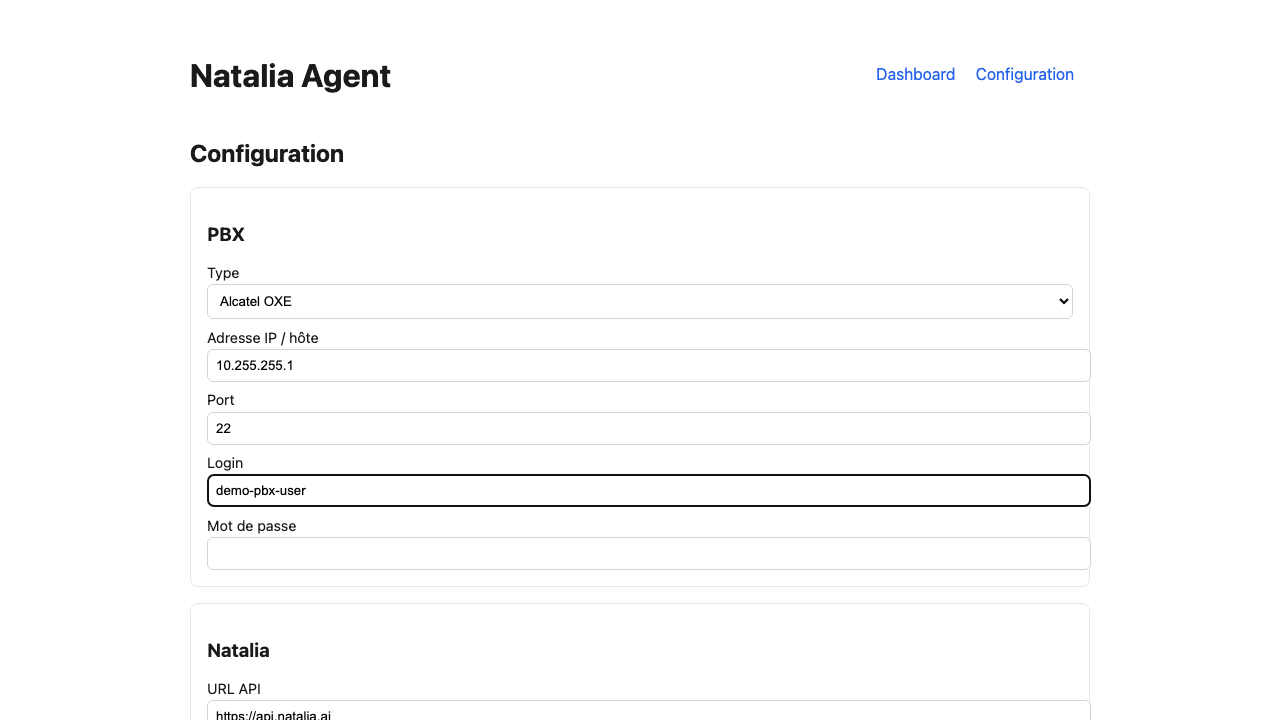
Step 4/4
Test the connection
Click "Test the connection". The appliance opens an SSH session, lists the CDR folder and returns a result within 10 seconds:
| Result | What to do |
|---|---|
| OK | Save. Collection starts at the next cycle. |
| AUTH_FAILED | Wrong login or password, or no read right on the ticket files. |
| HOST_UNREACHABLE | SSH not enabled (step 2), wrong IP, or port 22 filtered. |
| SSH_HOST_KEY | The OXE presents a different key from the pinned one. |
| CDR_PATH_NOT_FOUND | Folder missing: license inactive (step 1) or non-standard path (step 3). |
OXE collection flow
flowchart LR
    OXE["Alcatel OXE
/usr4/account"] -->|"SSH/SCP :22
read-only"| APP["Natalia appliance
your datacenter"]
    USERS["Your teams"] -->|"HTTPS :443
LAN"| APP