ROI tracking Method and dashboards
In Trends, the Costs tab prices the time your agents spend in conversation, and the Improvements tab measures what each change you make saves them. Both report what is observed; neither projects a saving.
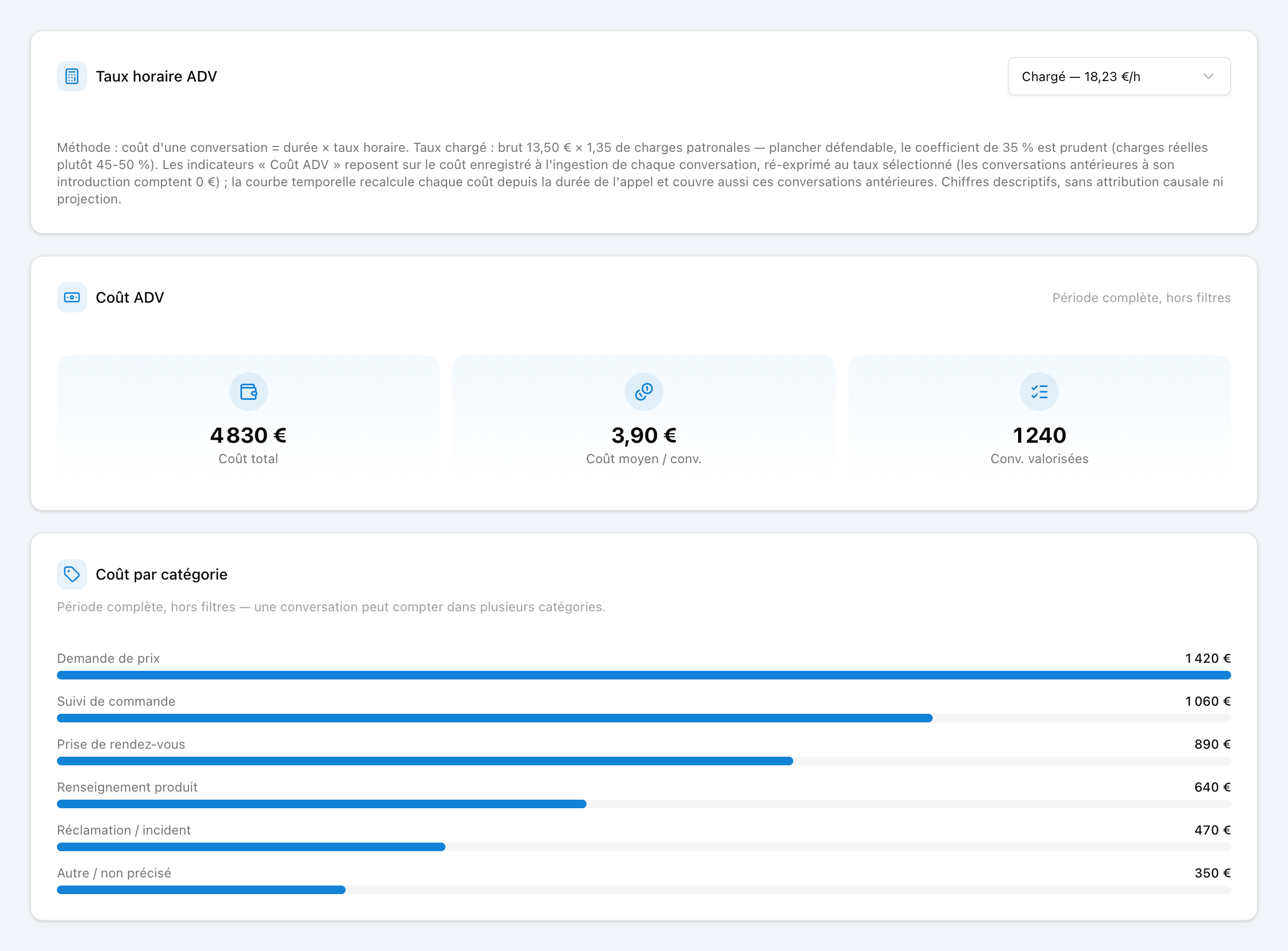
Loaded hourly rate
The cost of a conversation is its duration multiplied by what an agent hour costs your organisation, salary and charges included. Three profiles frame the usual range; you can also enter your own rate. Only conversations led by an agent are counted: those handled by the Natalia AI agent alone are left out.
Gross
13,50 €/h
Lower bound: base salary only, no employer charges.
Loaded
Default18,23 €/h
13.50 × 1.35, a deliberately conservative coefficient — real employer charges are closer to 45-50%.
Fully loaded
25 €/h
Management, premises, IT included (22-28 €/h range).
- One rate for the whole history. Changing the rate recalculates every cost shown, including conversations analysed earlier. When your organisation has branches, each branch's conversations are priced at that branch's rate.
- Rounding. A total adds up exact costs and is rounded to the cent once.
- Unknown duration. A conversation whose end is not recorded counts neither in time nor in cost; the number of such conversations is shown separately.
- Conversation in several categories. In the cost per category, it counts in full in each of its categories, so the lines can add up to more than the total. In the evolution chart and in improvements, its time is split equally between them.
Declaring an improvement
An improvement is a change you made to reduce the time spent on one category of conversations: an online booking page, an automatic text message, an FAQ. You declare it with a category, a title and a rollout date. Natalia then compares the agents' time on that category before and after the date.
By hand
In the Improvements tab, "Add an improvement": choose the category, give a title and the rollout date.
From a recommendation
In the Summaries tab, tick "Done" on a recommended action: the category and title are filled in, only the date remains.
The date cannot be in the future, and the analysed history must cover the 56 days before it. Deleting the tracking removes the improvement and its figures, totals included; a recommendation marked as done goes back to to-do.
Before and since
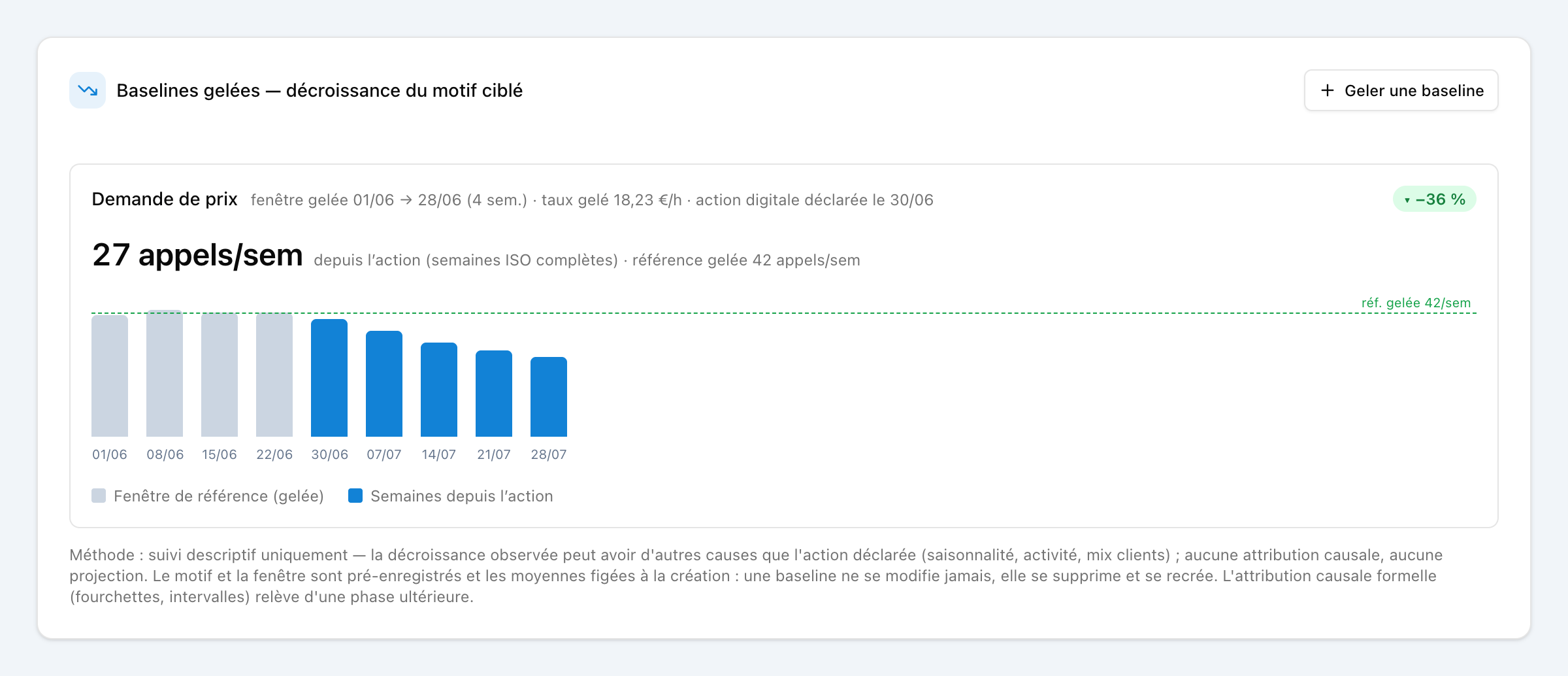
Before is the agents' weekly average time on the category over the 56 days preceding the rollout date. It is frozen when the improvement is declared and never recalculated afterwards. Only the time is frozen: its cost follows the current hourly rate.
Since is the average of the whole weeks, Monday to Sunday, that follow the rollout week within the selected period. The rollout week and the current week are never counted, so a partial week does not skew the comparison. When a later improvement targets the same category, the following weeks are attributed to it.
Each improvement shows conversations, average duration, agent time and cost per week, before and since, with the gap. The effect is judged on time: a drop of more than 5% is a measured saving, a rise of more than 5% a measured increase, anything in between no measured change. With no whole week yet, the improvement stays "under observation".
Time saved
The time saved by an improvement is its before multiplied by the number of measured weeks, minus the time actually spent over those weeks. The total adds up the improvements with a measured saving, valued at the hourly rate; an increase is never subtracted. The weekly figure is an average: this total spread over the whole weeks of the selected period covered by the analysed history.
It is an estimate: an improvement coincides with the change in your agents' time, nothing guarantees it is the cause. The figures describe what was observed, with no causal attribution.
Want to size your own potential?
The dashboard reports on your real traffic. To get a first estimate before connecting your telephony, the calculator runs the numbers from a few inputs.